I've used WordPress for 20 years, and I've stopped recommending it
My agency has built more than 1,500 commercial websites, most of them on WordPress. These days I tell clients not to use it.
 Ajay Chavda19 min read
I built my first website in 2002, on Microsoft Windows. By 2004 I was running one of the most trafficked internet security forums around. Since then I've built thousands of sites on WordPress, and my agency has built more than 1,500 commercial websites over close to twenty years. WordPress paid my bills for most of that time.
For most of those years, WordPress was what I recommended. If someone couldn't run a static site and the other platforms didn't suit them, I pointed them to WordPress, because it was easy to use and easy to update. I don't make those recommendations any more.
The problems have been piling up for years, the people running the project aren't fixing them, and the way websites get built and read is about to change again.
I'll start with what goes wrong on a WordPress site today, then explain what we built instead.
A normal day on WordPress
If you run an agency, you know this day. Overnight, a dozen plugins across your client sites pushed updates. One of them was a security fix you had to install. At 8:40 a client calls: the checkout page is blank. At 9:15 another one emails a screenshot of a contact form that hasn't sent a single enquiry since Friday.
Now you work out which of the 30 plugins on that site caused it. You switch them off one at a time, or you rename folders over FTP. You find the culprit, hunt down the previous version, upload it, and hope the update didn't change the database in a way the old version can't read. In my experience that takes hours, and you can't bill a minute of it. You have full SSH access and sometimes one compromised site nukes every site on that server.
That morning is common. CloudLinux and WebPros surveyed WordPress agencies in 2026, and 65% named keeping plugins and themes updated as a top challenge. For agencies managing more than 100 sites it was 75%, and 45% of those still update sites by hand, one at a time. Most of these businesses are small: 78% are solo operators or teams of ten or fewer.
WordPress has no sandbox at all
Every WordPress plugin runs inside the same PHP process as core, with the same access to your database and files. A slider plugin can read your users table. A form plugin can send your data to any server on the internet. There is no permission prompt and no way to limit what a plugin can touch. The amount of sandboxing is zero.
That would matter less if plugins were safe. They aren't. Patchstack recorded 11,334 new vulnerabilities in the WordPress ecosystem in 2025, 42% more than the year before. 91% were in plugins and 9% in themes. Only six were in core. 46% had no fix from the developer by the time they were made public, and the median time from disclosure to mass exploitation for the most attacked ones was five hours. In 2024, 1,614 plugins and themes were pulled from the directory for unpatched security issues, many of them abandoned while still running on live sites.
When a site does get hacked, it's usually WordPress. Sucuri found that 95.5% of the infected sites it cleaned in 2023 ran WordPress. Part of that is market share. For the agency owner taking the call, that's no comfort.
Updates break sites, and rolling back is manual
WordPress does have some rollback. Core restores itself if its own auto-update fails, and since version 6.6 a plugin auto-update is reversed if it throws a PHP fatal error. That covers a narrow case. A theme update that wrecks your layout, a plugin update that stops your forms sending, a checkout that loads but no longer takes payment: WordPress sees nothing wrong with any of these. You find out from your client, and you roll back by hand.
So most people turn auto-updates off and fall behind on security patches. That's how 39.1% of the CMS installs Sucuri cleaned came to be out of date at the time they were infected.
I know the replies, because I've given them myself. Turn off auto-updates. Change this setting. Run every update through staging first. Pin your plugin versions, move to a managed host, pay for a maintenance service. It's all reasonable advice, and we've done all of it. But every client has their own requirements and their own way of running their site. One has a booking system wired into their CRM. Another edits pages from their phone at 10pm. Another has a plugin nobody remembers installing, added by a developer who left three years ago. A process that works on one site falls over on the next.
And when a site keeps breaking, the cause is usually the layers themselves. A caching plugin to fix the speed, a security plugin to protect the other plugins, a staging setup to make updates safe, a backup service in case the staging setup misses something. Each one is a band-aid over the last band-aid. A fragile platform doesn't get sturdier when you add more of them.
Every business site needs forms, redirects, SEO, internal linking, entities to match their business case, schema. Caching is critical to speed up the site and yet none of these are part of wordpress core.
The admin has become an advertising space
Open the dashboard of a typical WordPress site and count the banners. Upgrade to Pro. Rate us five stars. Black Friday sale. Your licence is about to expire. Plugins are allowed to put notices anywhere in the admin, so they do, and the people who actually use the site learn to ignore every message, including the ones that matter.
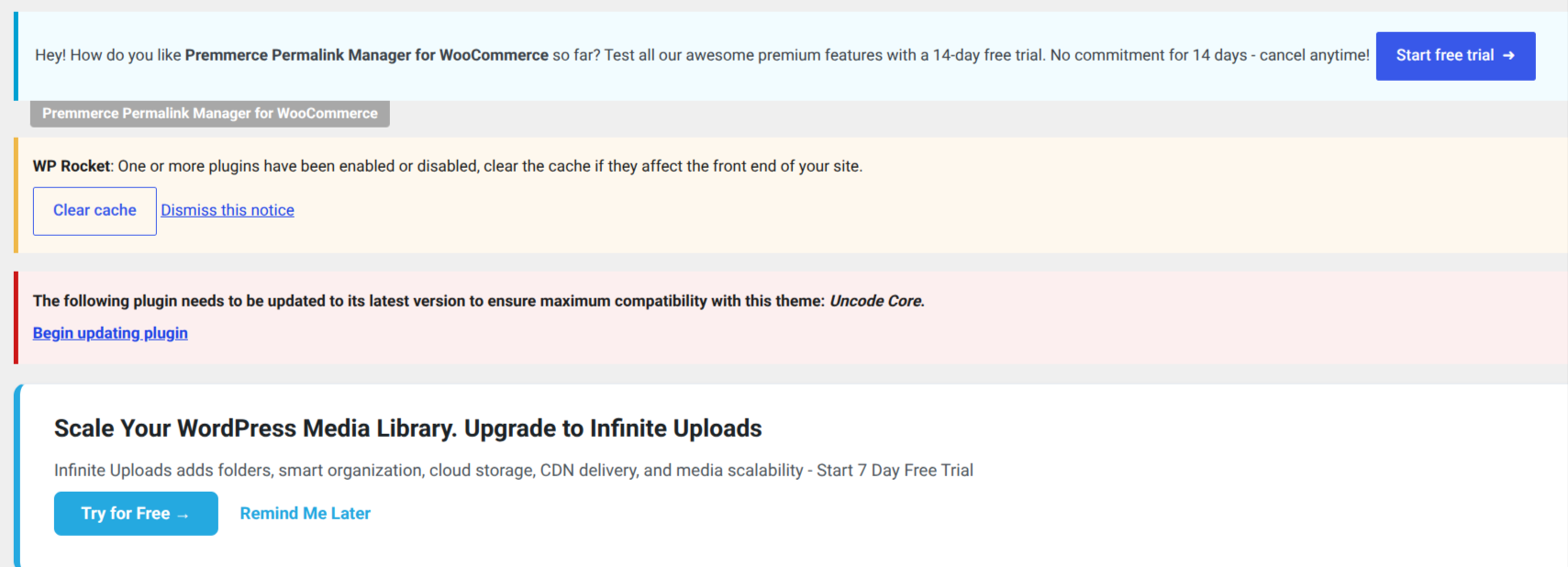
The plugin directory works the same way. Search for almost anything and you get dozens of near-identical "free" plugins, each a front for a paid version. Most free themes are trial versions with footer credit links and locked features.
Slow by default
The HTTP Archive measures real-user performance across platforms. In November 2025, only 46.28% of WordPress sites passed Core Web Vitals, last of the platforms compared. Drupal managed 63.27% and Duda 84.87%. Core has no page cache, so speed depends on more plugins. In the agency survey, plugin and theme bloat was the number one performance problem, cited by 59%.
Users said no to Gutenberg, and nobody listened
The block editor arrived in 2018. Today the Gutenberg plugin has a rating of 2.1 out of 5 from 3,887 reviews, and 2,490 of those are one star. The official Classic Editor plugin, which exists to switch Gutenberg off, has more than 8 million active installations.
One person controls the platform your business runs on
In September 2024, Matt Mullenweg, who controls WordPress.org and leads Automattic, banned WP Engine from WordPress.org, cutting off updates to thousands of sites hosted there. In October, WordPress.org took over WP Engine's Advanced Custom Fields plugin and replaced it on users' sites. Contributors had to tick a box confirming they were not affiliated with WP Engine to log in, and long-time contributors who questioned it paused their work or were banned. A US court later ordered Automattic to restore WP Engine's access.
Then the work slowed. Automattic cut its pledged contribution from nearly 4,000 hours a week to 16, and WordPress moved to one major release a year with a backlog of about 13,000 tickets. Joost de Valk, the founder of Yoast, put it this way:
WordPress only slows down because he's forcing it to slow down, not because there are not contributors willing to work on it.
APIs, webhooks and backups are afterthoughts
WordPress launched in 2003. Its REST API for content arrived in version 4.7 at the end of 2016, and a built-in way for other software to log in to it, application passwords, only came in version 5.6 in 2020. Core still has no webhooks. If you want your CRM to know when a form is submitted or a post goes live, you install another plugin and trust it with your data.
Backups are worse, because WordPress has no backup feature at all. Its built-in export produces an XML file of your posts and pages, without your media files, settings, plugins or theme. So every serious site runs a backup plugin or pays its host for one, and finds out whether the restore actually works on the day it's needed. Moving to a new host or domain is a project of its own, because WordPress stores full URLs throughout the database, including inside serialised PHP data that breaks if you edit it with a plain search and replace.
The basics are still plugins
Schema. Structured data is added after the fact by a plugin, as generic JSON-LD. Core has no idea what an entity is.
Forms. A contact form usually means a form plugin, a spam plugin, a CAPTCHA service and an SMTP plugin, and the spam still gets through.
Menus. Classic menus, the Navigation block, block themes and classic themes all behave differently. Change themes and your menus can disappear.
AI. WordPress can't tell you which AI read which page, and has no safe way for an AI agent to draft or publish.
What a CMS has to do now
I've reported security vulnerabilities to Google, Shopify, ServiceNow, Salesforce, Microsoft and countless other vulnerability disclosure programs. I've also spent close to twenty years running an agency and fixing other people's websites. With both of those hats on, I think the time has come for a better CMS.
There's no shortage of alternatives. Webflow, Wix, Squarespace, Ghost, Craft, Statamic and a long list of headless CMSs all compete for the same sites. We've used plenty of them. But after more than 1,500 commercial sites and close to twenty years running an agency, we know what business owners and site owners actually run into: the site that goes down after an update, the enquiry form that quietly stops sending, the hacked site on a Monday morning, the page that's slow on a phone, the content that Google and AI tools misread. Each alternative we tried fixed some of those. The hosted ones did it by tying your business to a single company's platform, and none were built for the way AI is changing how sites get written and read.
And most clients don't need much. They need a simple page editor, a simple way to post news, simple forms, a simple menu manager, simple caching, and a website that just works and never breaks.
Patching WordPress won't fix this either, because its problems come from decisions made twenty years ago. A number of things a CMS has to get right from the start, and how Hatamoto does each one.
1. Be ready for automated publishing
Within a few years, a lot of publishing will be done by software. An AI agent will draft the weekly post, refresh the prices on a service page, add the new suburb to a location page and fix the broken link a crawler found overnight. Agencies are already moving: in the 2026 survey, 92% use AI tools and 39% run AI coding agents. A CMS built for one human clicking buttons in a browser isn't ready for that.
Hatamoto has an MCP server built in, the open standard AI agents use to work with other software. Each agent gets its own API key, limited to what it needs: a key that can only read can't change anything, and a key that edits posts can't touch your menus, media or redirects unless you allow it. Anything an agent creates starts as a draft. It goes through the same validation, cleaning and plugin checks as a human editor. Every call it makes, allowed or refused, is written to an audit log. Every save is a revision you can compare and restore, so an agent's mistake takes one click to undo.
2. Get out of the way, like your phone does
Your phone updates itself overnight. You don't read a changelog, you don't take a backup first, and you don't lose a morning when it goes wrong. Android phones, for example, install the update to a second copy of the system and fall back to the old one if the new one won't start. A website deserves the same treatment. You should be able to stop thinking about updates.
Hatamoto is one program. It keeps the previous release next to the new one, and it never runs an update it can't undo.
Updates also come from one place. Core releases, themes and plugins are all signed, and Hatamoto checks the signature before it installs anything. Themes and plugins update from the admin, and a core update is a single command. Automatic updates from a central release channel are coming, and they'll go through the same checks described below.
3. Updates should never break the site, and if one does, it rolls back on its own
When Hatamoto switches to a new release, it checks the site before trusting it. The new version has two minutes to start. Then for the first minute it keeps loading your home page, your sitemap, a published page and the admin login, and compares the results with the last version that worked. A server error, a plugin that no longer loads, a page that used to work and now doesn't, or three crashes within two minutes, and Hatamoto puts the previous version back by itself. It then refuses to install the failed version again.
The rollback swaps the program and leaves your database alone, because every Hatamoto database change is written so the previous version can still run on it. You don't restore a backup, you don't use FTP, and it takes minutes instead of hours.
4. Heal itself
It amazes me that self-healing still isn't a standard part of content management systems. Phones, databases and cloud servers have recovered from their own faults for years. A CMS still waits for a person to notice the site is down, usually a customer.
Hatamoto already does a lot of this. If the server process crashes, the supervisor restarts it. If a new release fails its checks, the previous release comes back. If a plugin runs too long or uses too much memory, Hatamoto stops it and renders the page without it. If a theme fails validation when the site starts, Hatamoto falls back to the default theme so visitors still see a working site. Every one of these events is logged, so you can see what happened and why.
That's the start. The goal is a site that fixes what it can on its own and tells you, in plain words, about anything it can't.
5. Sandbox every plugin and make every permission explicit
Every Hatamoto plugin runs in a WebAssembly sandbox with hard limits on memory and time. A plugin declares what it needs, such as reading content, sending email or calling one named outside service, and you approve that list when you install it. Anything outside the list is refused. A plugin can't read your users table, and when a plugin crashes, Hatamoto ignores what it returned and renders the page as if the plugin weren't there.
6. Plugins should look after themselves, and stay out of your admin
Running a plugin should take no more of your time than an app on your phone. In Hatamoto, plugins and themes come from a signed registry. They install with one click and without a restart, and you update them from the same Plugins screen.
Developers who want to sell a premium version should be able to. Good software costs money to build, and I'd like a healthy market of paid plugins. What I don't want is a sales pitch on every screen of the admin. In Hatamoto, a plugin's settings page lives on its own tab, inside a sandboxed frame with no access to the rest of the admin. A plugin can't put a banner on your dashboard, because it has no way to reach it. If a developer wants to sell an upgrade, they can do it on their own settings page and in the registry, where people go looking.
7. Make every page machine-readable
Search engines, AI assistants and agents don't read your site the way a person does. They need to know which business this is, what it sells, where it operates, who wrote the article and how each page relates to the others. The web is moving towards content that a machine can read as easily as a human. A CMS that treats structured data as an optional plugin will be left behind.
In Hatamoto, every content type is a schema annotated with schema.org types. Your pages, JSON-LD, knowledge graph, sitemaps and llms.txt are all generated from that one model, so what search engines and AI systems read always matches what's on the page. Hatamoto also records every visit from known AI crawlers and assistants. You can see which AI read which page and whether it sent you visitors, and you choose which AI systems may read your site.
8. Be fast without a caching plugin
Hatamoto has a page cache built in. A cached page is served from memory in a few milliseconds, where building it from scratch takes tens of milliseconds to a hundred. You control it in Settings: switch it on or off, set how long pages stay cached, cap how much memory it can use, clear it, or preload every page in your sitemap so the first visitor never waits. When you save anything that changes a page, such as a post, a menu, a form or a theme setting, Hatamoto clears the cache straight away, so visitors never see an old version. There's nothing to install, and no Redis or Varnish to set up.
9. Build forms and custom fields without plugins
The forms builder has text, email, phone, long text, dropdown, radio button, tick box, date, number and web address fields, each with its own label, help text, width and validation rules. Submissions are stored in the admin, where you can mark them read, archive them or flag them as spam, and export them to CSV. Each form can email you a notification and send the person who filled it in a confirmation. A hidden honeypot field stops simple bots without a CAPTCHA, and the first-party webhooks plugin can tell your CRM or automation tool the moment a form is submitted.
Custom fields work the same way. Every content type has a field builder in Settings, where you add fields, name them and drag them into order. You don't need Advanced Custom Fields, or anyone's permission to keep using it.
Menus, redirects with a 404 log, and version history on every save are in core too. The default theme has no footer links and no upsells.
10. Make APIs, webhooks and backups first-class
The REST API and the MCP server use the same services as the admin, so validation, permissions and version history are identical whichever way a change arrives. The REST API covers your content with scoped keys, and the MCP server also reaches media, menus, redirects, terms and AI analytics. Every key can be limited and rate-limited, and every agent call is logged.
Webhooks come from a first-party plugin. It sends an event when content is created, updated, published or deleted, when a form is submitted and when an import finishes. Every delivery is signed with HMAC-SHA256 so the receiving system can check it came from your site, and failed deliveries are retried.
Backups and moves take one command each. hatamoto export writes the whole site to a single archive: every page and post with every saved version, media files, menus, forms and submissions, redirects, users, authors and settings. hatamoto import rebuilds it on a new server from an empty database. Run the export from a nightly scheduled job and you have daily backups you can actually restore.
11. Keep the stack simple
Hatamoto is written in Go and runs as a single binary on your server. You copy one file across, point it at a database and start it. There's no PHP version to match, no Node build step and no folder of plugin code to keep in sync. For now, the database is PostgreSQL.
Plugins run as WebAssembly, using Extism, an open-source plugin framework, on the wazero runtime. That's what makes the sandbox and the permission checks possible. Plugins are written in Go today, and because Extism has kits for other languages, more will follow.
Public pages are built on the server from Go and plain HTML. Every page arrives in the browser as complete HTML, so search engines and AI crawlers read the full content without having to run any JavaScript. Themes use templates the same way WordPress themes do: a layout for a single post, one for an archive, one for a page, one for a 404, and partials for the header and footer. If you've built a WordPress theme, the structure will feel familiar. Full documentation for themes and plugins is on its way.
It's light, too. On hatamoto.dev, the Hatamoto process uses about 280 MB of memory, and the supervisor that watches it about 27 MB. The whole program is one 49 MB file. With PostgreSQL alongside it, Hatamoto fits on the entry-level servers that Vultr, DigitalOcean and AWS Lightsail rent for around US$5 a month.
12. Let nobody own it
Hatamoto is open source under the Apache-2.0 licence, with signed release binaries, a Docker image and full documentation. You can run it, change it and move it, and no company or individual can lock you out of your own site.
What twenty years taught me
I didn't set out to build a CMS. I got tired of patching, restoring and apologising to clients for problems the platform kept creating. Websites are about to be written, updated and read by software as much as by people. I want a CMS that is ready for that, and that stays out of my way the rest of the time. That's Hatamoto.
Register for Hatamoto updates
Release news, early access to 1.0 and the WordPress migration guide. No spam, unsubscribe any time.