How we built a Hacker News clone on Hatamoto
news.hatamoto.dev runs on one plugin, one theme and one kit. Here is what went into core, what stayed in the plugin, and what load and abuse testing found.
Ajay Chavda
An open-source CMS written in Go. One binary runs your site, admin, API and MCP server next to Postgres. Plugins run in a WebAssembly sandbox (Extism), AI crawlers are counted on the server, and signed updates roll themselves back.
Server
curl -fsSL https://hatamoto.dev/install.sh | sudo shOn a fresh Linux VPS: installs Postgres, Hatamoto under systemd and Caddy with automatic HTTPS, then turns on nightly backups and signed updates.
Docker
git clone https://github.com/Zen-Labs-Corp/hatamoto && cd hatamoto && docker compose upOn your laptop: Postgres and Hatamoto start, secrets are generated, migrations run.
Your agent
Install Hatamoto, the open-source CMS, on this machine with Docker. Follow https://hatamoto.dev/docs/getting-started/install-docker and give me the admin address when it is running.Paste into any coding agent with shell access to your machine.
The sign-in page shows a shared login. Resets every hour.
Already in core
The builder, SEO, cache, forms, redirects, security, 2FA, backups, cookie consent, WebP images, media folders, find and replace, CSV import, an email log and more ship in core and update together.
01
The site, admin, REST API and MCP server run as one Go binary on one port. No PHP, no Node, no build step.
hatamoto serve
02
All content, settings and analytics live in Postgres. Migrations are embedded and run on boot.
postgres
03
Plugins are WebAssembly, run inside the process with memory and time limits and only the permissions you tick.
extism · wazero
04
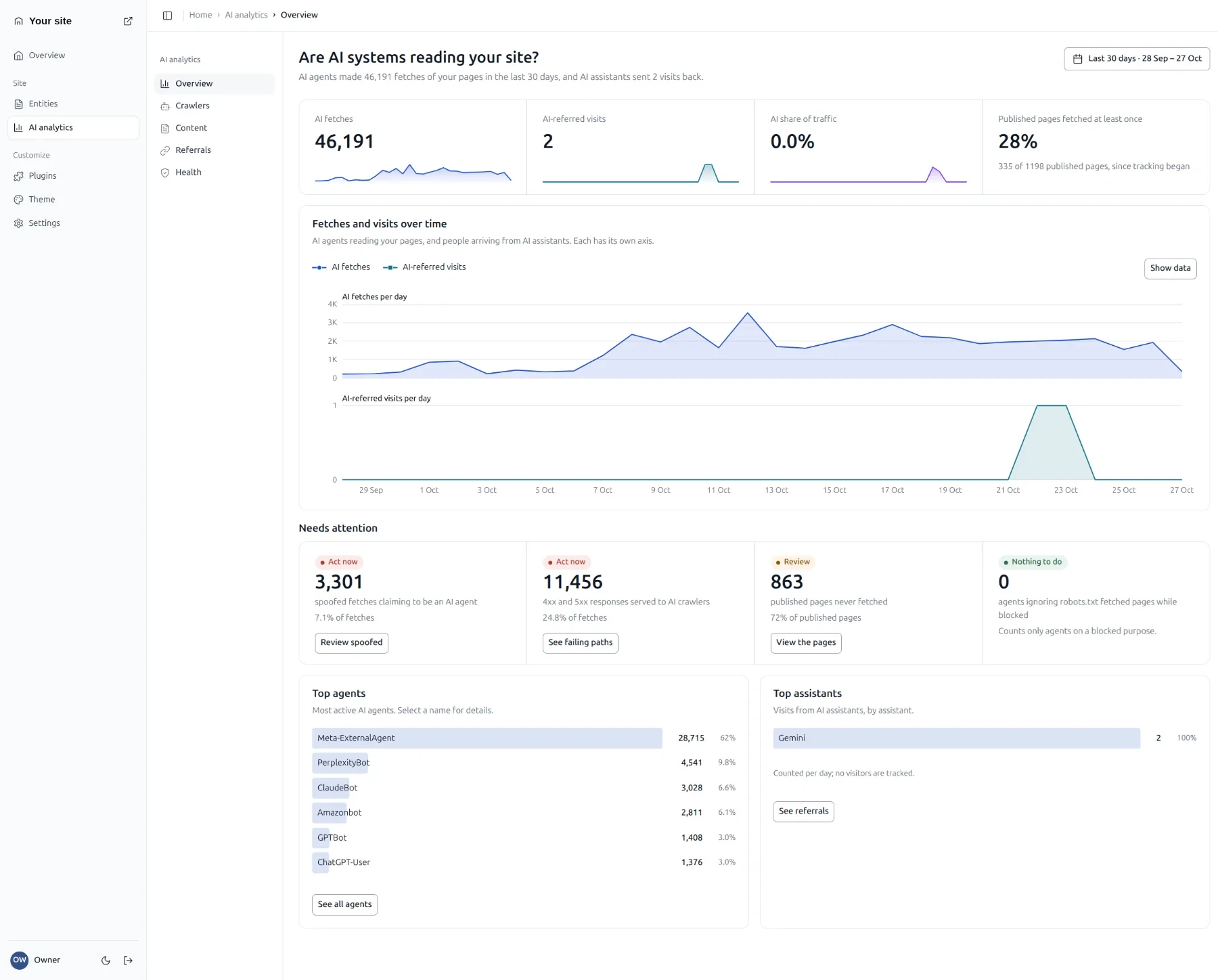
Every crawler fetch is logged as it is served and checked against published IP ranges and reverse DNS. No script on the page.
no script on the page
05
Agents connect at /mcp with a scoped key and go through the same services as the admin: validation, hooks, cache, audit.
/mcp · REST · CLI
06
Releases are signed and ship on canary, edge and stable. If the site fails its health check, the previous version comes back.
canary · edge · stable
Hatamoto vs Google Analytics
GA counts people whose browser runs its tag. AI crawlers don't run tags, so GA never sees them. Hatamoto counts on the server, where every request lands.
| What you want to know | Google Analytics | Hatamoto |
|---|---|---|
| AI crawler visitsGPTBot, ClaudeBot, PerplexityBot and 40 more | Not seen. Crawlers never run your JavaScript tag, so to GA they don't exist. | Every fetch, counted on the server, with the agent, the operator and the page it read. |
| Fake AI botsScrapers using a real crawler's name | Not seen. | Each claimed crawler is checked against its operator's published IP ranges and reverse DNS. Fakes are flagged. |
| Errors served to AI404s and 500s that cost you citations | Not seen. | Every failing status code, with the exact paths that broke. |
| Pages AI hasn't readContent that can't be cited yet | No way to tell. | A list of published pages no AI crawler has fetched. |
| Visits sent by ChatGPT, Perplexity, Claude | Filed under Referral with everything else, unless you build a custom channel group. | Their own channel, broken down by assistant, from day one. |
| Cookies and visitor IDs | Sets cookies and a client ID. Visitors who decline consent or block the tag are missing. | No cookie, no visitor ID, no IP address stored for people. Daily counts only. |
| Where the data lives | On Google's servers, under Google's terms. | In your own Postgres. Nothing leaves your server. |
| Setup | A property, a tag (often via Tag Manager) and a consent banner to wire up. | Built in. On from the first page view, nothing to install. |
Keep GA for campaigns and conversions if you use them. Hatamoto shows you the traffic it was never built to see.
How Hatamoto thinks about content
Every page is a typed record before it is HTML. Search engines, answer engines and AI agents all read from that one record, in every language, so they can never disagree.
Schema
Build a content type in the admin: typed fields, a schema.org type and a URL pattern. No ACF, no custom code.
entity_schemas
Entity
The page, JSON-LD, sitemap entry, llms.txt line and MCP response all come from the same record and change together.
Accept: application/ld+json
Locale
Every entity carries a BCP 47 locale. Translations share a group, so hreflang and the language switcher come for free.
/fr/{pattern}
Why teams switch
Your analytics can't see AI crawlers. Hatamoto counts every fetch on the server and flags the fakes.
AI analytics
Each site gets a private admin address. Everything scanners try is a plain 404.
Security
Signed releases are checked after install and roll back on their own if the site fails its health check.
Auto-updates
Builder, SEO, cache, forms, redirects, security, consent and backups are in core.
Replace your plugin stack
Agents draft through the same rules as your team, with scoped keys and a full audit log.
AI agents & MCP
Scan, import, audit every old address, then cut over.
Move from WordPress
License
Use it for clients, fork it, sell it. hatamoto.dev runs the same code you download. Nothing in core will move behind Enterprise.
Privacy
No cookies, no visitor IDs, no IP addresses kept for people. Analytics are daily totals in your own Postgres, and no visitor data goes to Google or anyone else.
Extend
Write them with the Go SDK, or in any language with an Extism PDK.
From the blog
news.hatamoto.dev runs on one plugin, one theme and one kit. Here is what went into core, what stayed in the plugin, and what load and abuse testing found.
Ajay Chavda
How Hatamoto runs third-party plugins in Extism and wazero: always-on timeouts, throwaway instances after a trap, per-plugin Postgres roles, a guarded fetch, and details of the plugin ecosystem.
Ajay Chavda
Open source, one Go binary and Postgres. Install it in a few minutes.
Server
curl -fsSL https://hatamoto.dev/install.sh | sudo shOn a fresh Linux VPS: installs Postgres, Hatamoto under systemd and Caddy with automatic HTTPS, then turns on nightly backups and signed updates.
Docker
git clone https://github.com/Zen-Labs-Corp/hatamoto && cd hatamoto && docker compose upOn your laptop: Postgres and Hatamoto start, secrets are generated, migrations run.
Your agent
Install Hatamoto, the open-source CMS, on this machine with Docker. Follow https://hatamoto.dev/docs/getting-started/install-docker and give me the admin address when it is running.Paste into any coding agent with shell access to your machine.